Glastia Monoline Font: Adding Authenticity to Your Design Workflow
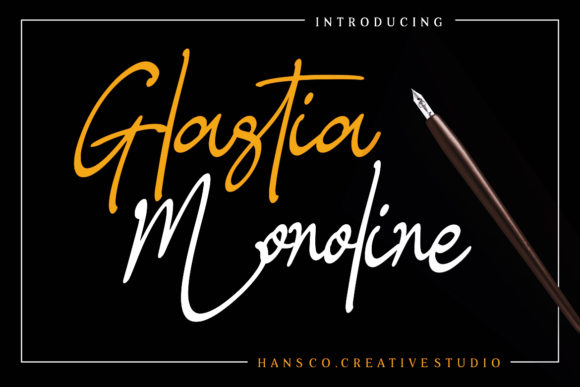
Glastia Monoline is an elegant handwritten signature font that brings a unique, organic feel to digital and print projects. Designed with the nuances of real handwriting in mind, this font mimics the natural flow and imperfections of human pen strokes. It’s ideal for designers, marketers, and creatives looking to add a personal, authentic touch to their work without compromising on professionalism.
Understanding Glastia Monoline
Glastia Monoline is more than just a typeface; it's a tool that can elevate your design by introducing a sense of individuality and warmth. Unlike standard sans-serif or serif fonts, which often appear sterile or overly structured, Glastia Monoline captures the essence of a real signature. This makes it particularly well-suited for use in branding, invitations, quotes, and other applications where a personal touch is essential.
The font is based on organic handwriting, meaning each stroke has a natural variation that reflects how a person might write with a pen. This subtle irregularity adds character and helps differentiate your designs from generic, mass-produced content.
Where Glastia Monoline Fits in Your Design Process
Integrating Glastia Monoline into your workflow can happen at various stages, depending on your project needs. Whether you're starting from scratch or enhancing an existing design, this font can be used effectively before, during, or after key phases of your creative process.
Before Starting a Project
Before beginning a new design, consider using Glastia Monoline as part of your concept development. For instance, if you're creating a brand identity, using this font in early sketches or mood boards can help establish the tone and personality of the brand. Its handwritten nature can inspire a more approachable and human-centric image, which is especially useful for startups or small businesses aiming to connect with their audience on a personal level.
You can also use Glastia Monoline to draft initial text elements such as taglines, headlines, or even notes to yourself. This can streamline your planning phase by providing a visual reference that aligns with your overall vision.
During the Design Phase
Once you begin designing, Glastia Monoline becomes a powerful asset for adding authenticity to your visuals. It works particularly well in areas like logos, social media graphics, email headers, and website banners. When paired with clean, modern typography, it can create a balanced contrast that draws attention without overwhelming the viewer.
If you're working on a marketing campaign, incorporating Glastia Monoline into call-to-action buttons, testimonials, or customer quotes can enhance engagement. The font's organic feel encourages trust and familiarity, making it easier for audiences to relate to your message.
Another practical use is in creating personalized content such as thank-you notes, wedding invitations, or business cards. These items benefit greatly from the handwritten aesthetic, as they convey sincerity and thoughtfulness.
After Finalizing a Design
Even after completing a project, Glastia Monoline can still play a role in refining your output. For example, you might use it to add a signature or a final note on printed materials, digital assets, or packaging. This can serve as a subtle but effective way to reinforce your brand's identity and leave a lasting impression on your audience.
Additionally, when reviewing your work for consistency or quality control, you can check how Glastia Monoline interacts with other design elements. Ensuring that it complements rather than competes with other fonts, colors, and images will help maintain a cohesive look across all platforms.
How Glastia Monoline Integrates with Other Tools and Resources
Glastia Monoline is compatible with most design software, including Adobe Photoshop, Illustrator, Canva, and Figma. Its versatility allows it to be used across different file formats, making it easy to incorporate into both digital and print projects. You can download the font from reputable sources and install it on your computer or cloud-based workspace for seamless access.
When working with other tools, consider how Glastia Monoline interacts with them. For example, if you're using Canva for graphic design, you can select the font from the built-in library and apply it directly to your templates. If you're editing video in Premiere Pro or After Effects, you can import the font and use it in titles or captions to add a personal flair.
It's also worth noting that Glastia Monoline pairs well with minimalist backgrounds and layouts. This combination ensures that the font remains the focal point while maintaining a clean and professional appearance.
Practical Implementation Tips and Workflow Examples
To get the most out of Glastia Monoline, consider these tips for integrating it into your workflow:
- Use it sparingly: While the font adds character, overusing it can make your design feel cluttered. Reserve it for key elements such as headings, signatures, or short phrases.
- Experiment with spacing: Adjusting letter and line spacing can help improve readability and ensure the font doesn't overpower other design elements.
- Pair with complementary fonts: Combining Glastia Monoline with a sans-serif or serif font can create a balanced and visually appealing layout.
- Test across devices: Ensure that the font displays correctly on different screens and resolutions. This is especially important for web-based projects.
- Save as a style guide: If you're using Glastia Monoline regularly, create a style guide that outlines its proper usage, including font sizes, colors, and spacing guidelines.
For example, imagine you're designing a social media post for a boutique clothing brand. You could use Glastia Monoline for the headline "Handcrafted with Love" and pair it with a clean sans-serif font for the body text. This combination creates a warm yet professional look that aligns with the brand's values.
In another scenario, suppose you're creating a digital newsletter for a wellness blog. Using Glastia Monoline for the subject line or featured quote can add a personal touch that resonates with readers. This subtle detail can help build a stronger connection between the content and the audience.
Factors to Consider for Long-Term Use
While Glastia Monoline is a versatile font, there are several factors to keep in mind for long-term use. First, ensure that the font is properly licensed for commercial use if you're using it in client projects or selling products online. Many free fonts come with restrictions, so it's important to review the licensing terms before downloading and using them.
Second, consider the scalability of the font. Although it's designed for readability, some handwritten fonts may not scale well at very large or very small sizes. Test it in different contexts to ensure it maintains its integrity across all uses.
Lastly, think about how Glastia Monoline fits into your broader design system. If you're working on multiple projects or collaborating with others, establishing clear guidelines for its use will help maintain consistency and avoid confusion.
By taking these considerations into account, you can ensure that Glastia Monoline remains a valuable asset in your creative toolkit for years to come.